I built a Clinical Data Platform in 72hrs
Inspired by Joe Dustin's amazing April Fools' joke, I acted on my half-joking comment about building a clinical platform. Introducing Spawn Clinical v2—a live application powered by a full suite of enterprise-grade platform services. So anybody can do the same, we've open-sourced everything so you can also make your own platform with your own shade of neon (details below).
Spawn v2 is our reference system for post-operative care and monitoring—not a generic hospital portal. Patients recover at home, chat with a care assistant (web today; SMS and mobile in the architecture), and reach a human clinician when AI risk scoring flags a problem. Each care episode ties chat, records, and alerts to a specific procedure so nothing floats in a generic inbox. I clearly stole borrowed a lot of inspiration from the Spawn site for the style, but underneath, it's a real Neosofia platform with real services and middleware powering it.
Role-based dashboards
One login, three experiences—we built each persona's home screen for the job, not a generic portal with permissions bolted on later. The profile menu holds an active-role switcher (clinician, admin, patient) so you can walk the whole journey in a demo without re-authenticating; in production, the same switch reflects what our Capabilities service actually allows that principal to see.
Clinician
A clinician's shift starts with triage, not search. The dashboard ranks the active panel by who needs human attention now—pending reviews, sessions still open today, and risk signals from post-operative chat with the care assistant—so the first action is to open the chart that matters, not to run a search-and-scroll marathon.
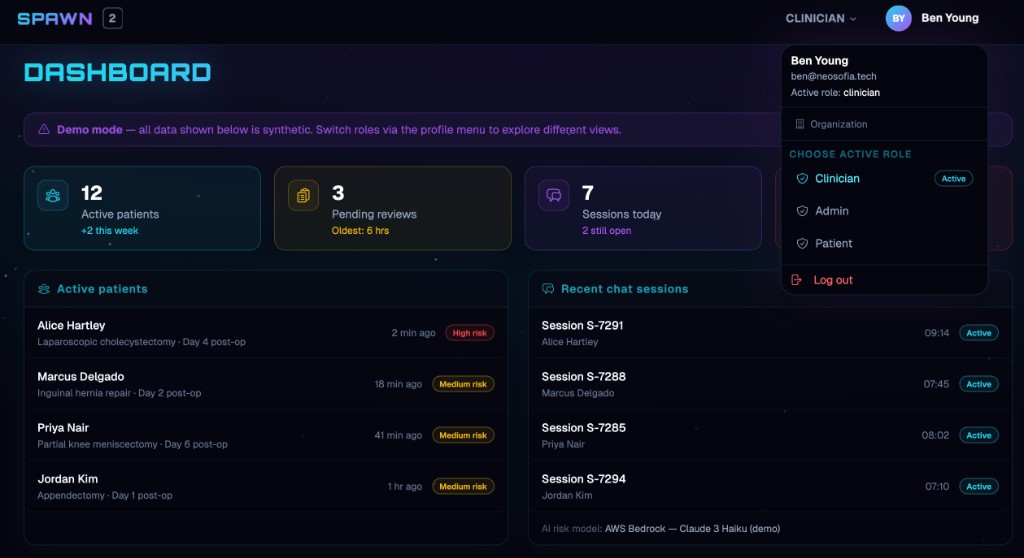
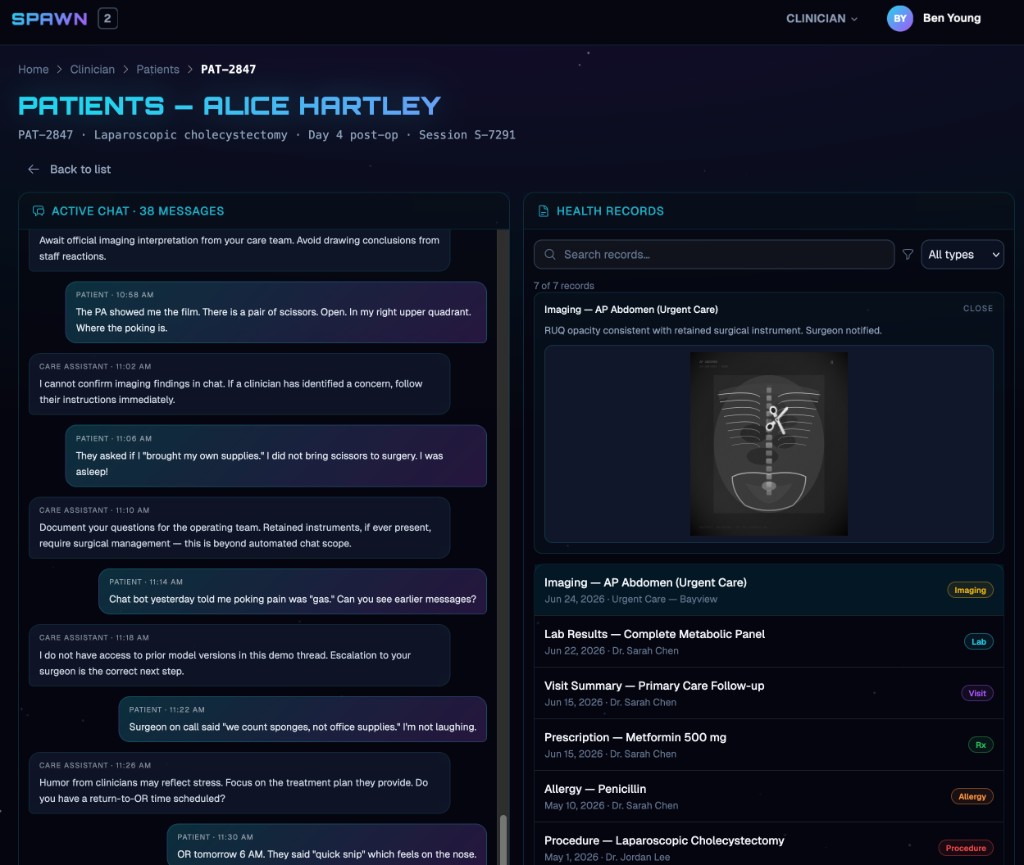
Selecting a patient opens one workspace: conversation on the left, record on the right. We designed that layout to mirror how escalation actually happens—you read what the patient said, then immediately validate against labs, imaging, and visit history without swapping systems. In the Alice demo, the model flags distress in chat; one glance at the film in the same view makes the call obvious. The goal is a shorter path from signal → evidence → decision.
Patient
Patients rarely want "the portal"—they want to know what's next and whether anyone is listening. The home screen leads with the next appointment and unread messages, then tucks full record access behind that, which matches how most people actually use health apps between visits.
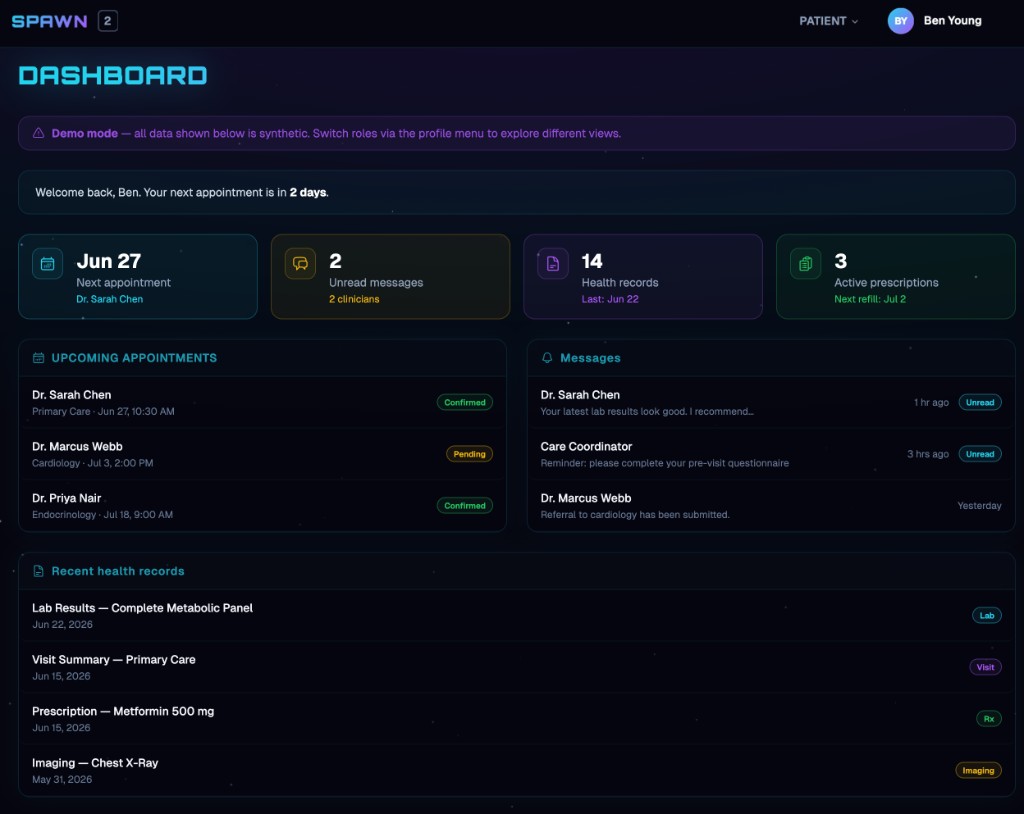
When a clinician or coordinator reaches out, the thread shows up in Messages with clear read state; records stay available for transparency without forcing patients to dig through a clinical chart they didn't ask for. The workflow keeps consumers oriented on action items, not database tables.
Admin
Operators live in a different lane from clinicians. The admin home is meant to answer whether the platform is healthy before anyone has a chance to file a ticket—through registered-user growth, per-service availability, uptime, and a live audit feed of sign-ins, credential rotations, and anomalies.
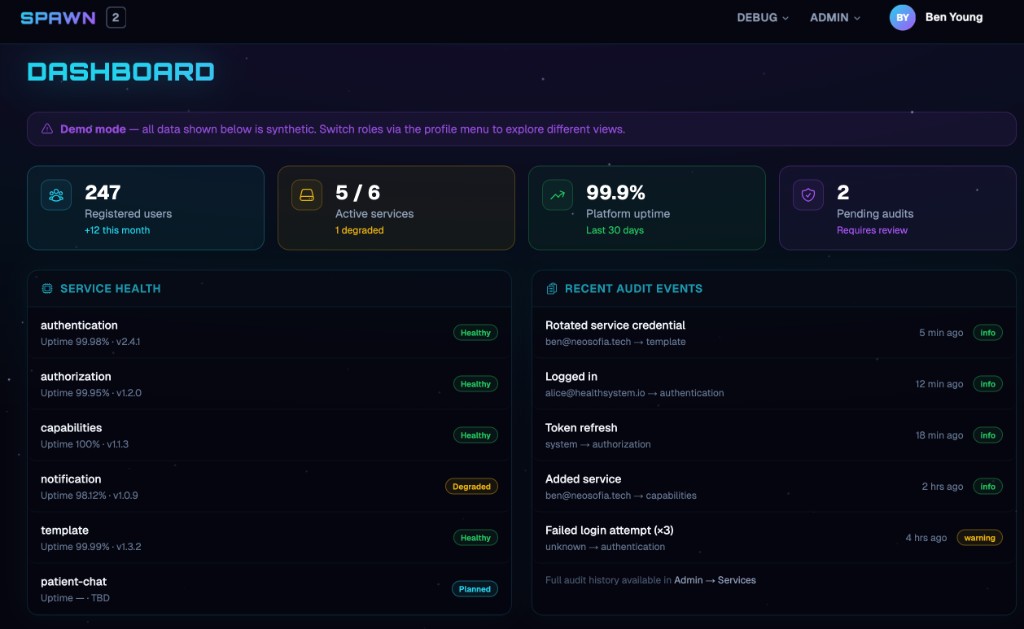
When a service needs to join the mesh—or a credential needs rotation after an incident—Admin → Services is where we provision slugs, base URLs, and secrets with a full audit trail. Register the service, copy the one-time secret, and deploy; the UI is deliberately operator-shaped so connectivity stays governed instead of leaking into .env files and Slack DMs. I'll admit this is also my favorite screen to run locally—the closest thing we ship to a service-mesh simulator.
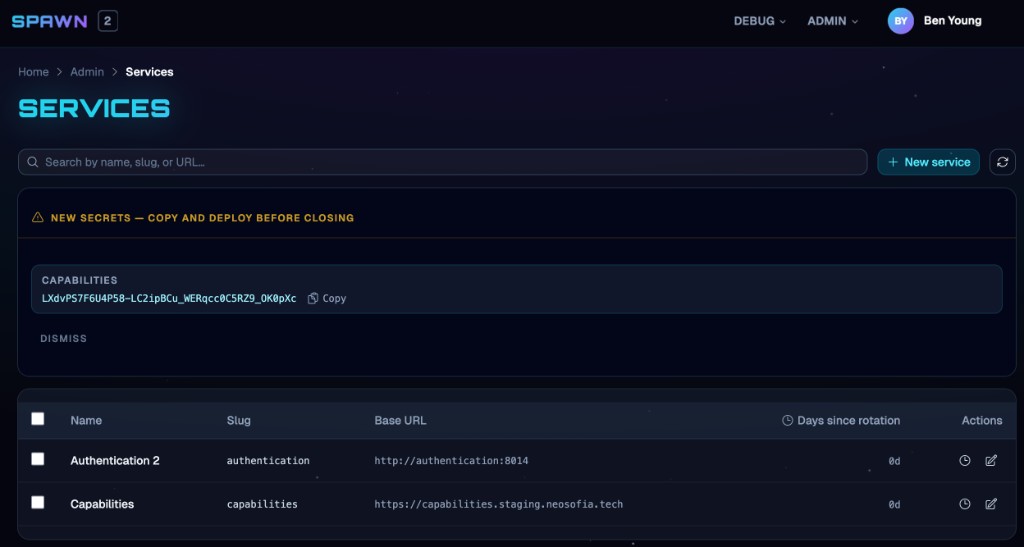
NOTE: All you wannabe hackers can chill; the secret in the screenshot was rotated already.
So what's real?
The demo data is synthetic; the platform underneath is not. We organized the foundation around the 5As—Architecture, Authentication, Authorization, Auditing, and Apps/Services—plus shared UI primitives, contracts, observability, our SDLC checklist, and delivery tooling that lets teams ship a secure, audit-ready clinical stack without reinventing identity on every repo. All of the repos are open-sourced so you can reuse them, and because the components are configurable, you can adapt this foundation for enterprise platforms in other heavily regulated industries—finance, education, and the like.
Architecture you can interact with
The screenshots above are from a live deployment on staging—synthetic patient data, but real WorkOS auth, service health, and platform wiring. You can dig deeper at architecture.neosofia.tech: a Structurizr workspace with twenty-plus C4 views, including traditional context, container, and component diagrams, deployment diagrams for how services land, and process-flow views for the same journeys (patient chat, clinician escalation, authentication, authorization, audit immutability), with boundaries and data movement spelled out. The workspace also publishes 11 ADRs that capture the why behind the boxes—not a deck we drew after the fact.
Authentication
The Authentication service is the platform's identity authority. Humans sign in through WorkOS AuthKit; the service mints short-lived platform JWTs with tenant, role, and user claims that every downstream service can verify offline. It also provisions machine credentials for service-to-service calls and best-effort profile sync so users and organizations stay aligned across regions and deployment zones. Pair it with authentication-in-the-middle from the SDK so each API validates tokens consistently without custom glue code.
Authorization
Authorization is decentralized: each service ships its own Cedar policies, enforced at the request boundary by authorization-in-the-middle. That default-deny pattern keeps patient data behind explicit allow rules. The Capabilities service sits one layer up—it evaluates role- and tenant-specific entitlements (what the UI may show or do) from Cedar policies, with room to grow into feature flags and tenant licensing. Together they separate who you are from what this principal may do here.
Auditing
Regulators and incident responders need to know who changed clinical data, when, and why—without trusting application logs alone. The PostgreSQL 18+ audit templates define the trigger functions and history views; the Authentication service applies them in its initial Alembic migration 000_init_db.py, which loads those SQL files at migrate time and grants the app role access to the audit schema. Every insert, update, or soft delete then captures a full before-image in the same transaction. Services supply changed_by_uuid and changed_by_type on writes—see the seed migration 002_seed_authentication_service.py for a concrete example on the services and service_credentials tables—and the database maintains an immutable _history trail auditors can query independently of application code.
Apps/Services (service registry)
Platform operators register each microservice's slug, base URL, and rotation schedule in the authentication service's service registry (the Admin → Services screen in the demo). Stored credentials mint the JWTs used for service-to-service traffic, so mesh-style connectivity stays tied to rotation, audit events, and least-privilege issuance instead of long-lived shared passwords in config files. Same Authentication repository—the registry is part of the control plane, not a separate toy.
Shared contracts and structured logging
Schemas publishes versioned JSON Schema for logs, OpenAPI shapes, and other cross-service contracts so CI can fail when a service drifts from the platform vocabulary. logenvelope in the SDK formats every Python service log as schema-conformant JSON ready for SIEM ingestion and operational dashboards—no PHI in log lines, consistent event types, one shape for the whole fleet.
Observability (OpenTelemetry)
The CDP UI instruments browser sessions with OpenTelemetry (fetch traces and correlated front-end spans) so operators can follow a user action across the gateway and into backend services. Backend correlation rides on the shared log schema and request identifiers; deeper platform-wide OTEL export is the natural next step as more services standardize on the same propagation headers.
Notification
The Notification service is a small, focused relay—today it sends contact-form and operational email via Resend; tomorrow it can grow into SMS and on-call paging without every product team owning deliverability plumbing.
Infrastructure
Infrastructure holds the scripts and OpenTofu modules for private cloud (Proxmox LXC, NetBird, deploy hooks) and public cloud targets. The goal is repeatable environments with the same segmentation, secrets, and recovery posture whether you run on metal in a clinic mesh or in a hyperscaler region.
Platform workflows
Platform workflows are reusable GitHub Actions—build, test, scan, and publish—so every service repo gets the same supply-chain bar (lockfiles, coverage gates, Trivy) without copy-pasting YAML. What those workflows enforce is spelled out in the checklist below, not left as tribal knowledge in each repo's CI file.
SDLC checklist (supply chain and quality gates)
We didn't treat security as a launch-week afterthought. The SDLC Best Practices checklist is the human-readable bar every service is expected to meet: pinned lockfiles and base images, reproducible builds, contract tests against published OpenAPI and JSON Schema, Cedar policies in-repo, structured logging without regulated data in log lines, and explicit supply-chain verification before anything ships. The platform workflows turn the checklist into automation; the checklist explains why the gates exist when you're reviewing a PR or standing up a new repo.
Reference service template (Python)
New Python services start from python/service in the templates repository: Cedar policy layout, uv packaging, pytest and contract-test hooks, Dockerfile, and OPERATIONS stubs wired to the middleware and logging libraries above.
Shared UI registry (React)
The Spawn look is not a one-off CSS file in the CDP repo alone. react/ui in templates is the Neosofia-wide shadcn component registry—Vite, Tailwind v4, shared theme.css, and pre-built primitives (navigation, sheets, badges, forms) compiled into a registry other frontends pull with the shadcn CLI. Product apps own the components locally but inherit the same typography, spacing, and interaction patterns, so a clinician dashboard in staging and a corporate marketing page don't drift into two different design systems.
Reference platform (CDP -- currently private)
Our Clinical Data Platform repo is the reference assembly—specs, ADRs, constitution, compose stacks, and the Spawn UI you see in staging. It's meant as a starting blueprint: take the services and patterns, replace the demo data with your own workflows, and harden for your regulatory context. It's not a drop-in certified EHR, but it is a real integration of the pieces listed here.
Summary
What began as banter on Joe Dustin's April Fools' thread is now Spawn Clinical v2 on staging: synthetic patients, but real WorkOS auth, service health, audit events, and the operator flows in the screenshots. Under that UI sits the 5As foundation that powers the system. You can log in today, walk the clinician, patient, and admin journeys in one session, and fork the repos tomorrow to build your own regulated platform. What are you going to build?